Claude app · Designed & built · 2026
NutriBll, private billing for the wellness boom
A Windows invoicing app first built for a supplement company. Fill in a form, watch the invoice update live, and save a print-ready vector PDF. No account, no server, and every byte of data stays on your computer.
The problem
The company sells supplements to two very different audiences: pharmacies and distributors whose accounts-payable teams process invoices by the hundred, and individual customers. One person in operations does all the invoicing.
The first version was a single form that printed a page. It worked, but it had real gaps:
- Totals were sometimes off by a cent. Floating-point money math and tax-inclusive pricing don’t mix, and an AP team will bounce an invoice that doesn’t add up.
- Everything was retyped. Same customers, same products, every single invoice.
- Nothing was remembered. Once an invoice went out, there was no record, no view of what was still unpaid, and nothing to hand the accountant.
- The PDF was a screenshot of a web page. It came out of the browser’s print dialog, so the text wasn’t reliably searchable and the layout changed from browser to browser.
What it does
The app is split into three workspaces so it never needs more than four tabs at once:
- Invoice. Items, Customer, Details, and Payment. Line items with optional product photos, shipping, discounts, percentage or flat tax (added on top or already included), six currencies, and Net 15/30/60 terms that set the due date for you.
- History. Every saved invoice is recorded. Mark it paid, see what’s overdue and the total still owed, or reopen and duplicate a past invoice. A CSV export goes straight into Excel, Google Sheets, QuickBooks, or Xero.
- Settings. Company details and tax IDs, saved customers and a product catalog that fill themselves in, the invoice design, and backups.
The preview on the right is the real page, scaled to fit like a print preview, so what you see is exactly what the customer gets. One click turns it into a searchable, selectable vector PDF of about 25 KB, generated on your own computer.
A quiet workspace around a loud page
The editor is deliberately calm: warm-cream surfaces, tinted fields with no borders, and hierarchy carried by type and spacing instead of lines and boxes. Explanations sit behind small info icons rather than under every heading, and the workspace switcher lives in the top bar so there’s only one row of navigation. A deep slate dark mode follows the Windows setting, or a button in the top bar.
The invoice page is the opposite on purpose. It keeps its own ink-on-white palette in both themes, so it’s always the strongest thing on screen and the preview still matches the PDF exactly.
A real Windows app
NutriBll started as a web app that installed from the browser. It now ships as a Windows installer of about 3.3 MB, built with Tauri, that installs for the current user without admin rights.
The web app runs unchanged inside the desktop window. Saving files was the one thing that had to change, because a download link inside the window would drop files silently into Downloads. PDFs, CSV exports and backups now open a native Save dialog, and the confirmation message names the exact path the file went to. Cancelling the dialog changes nothing, the invoice history included.
Seven styles, one invoice
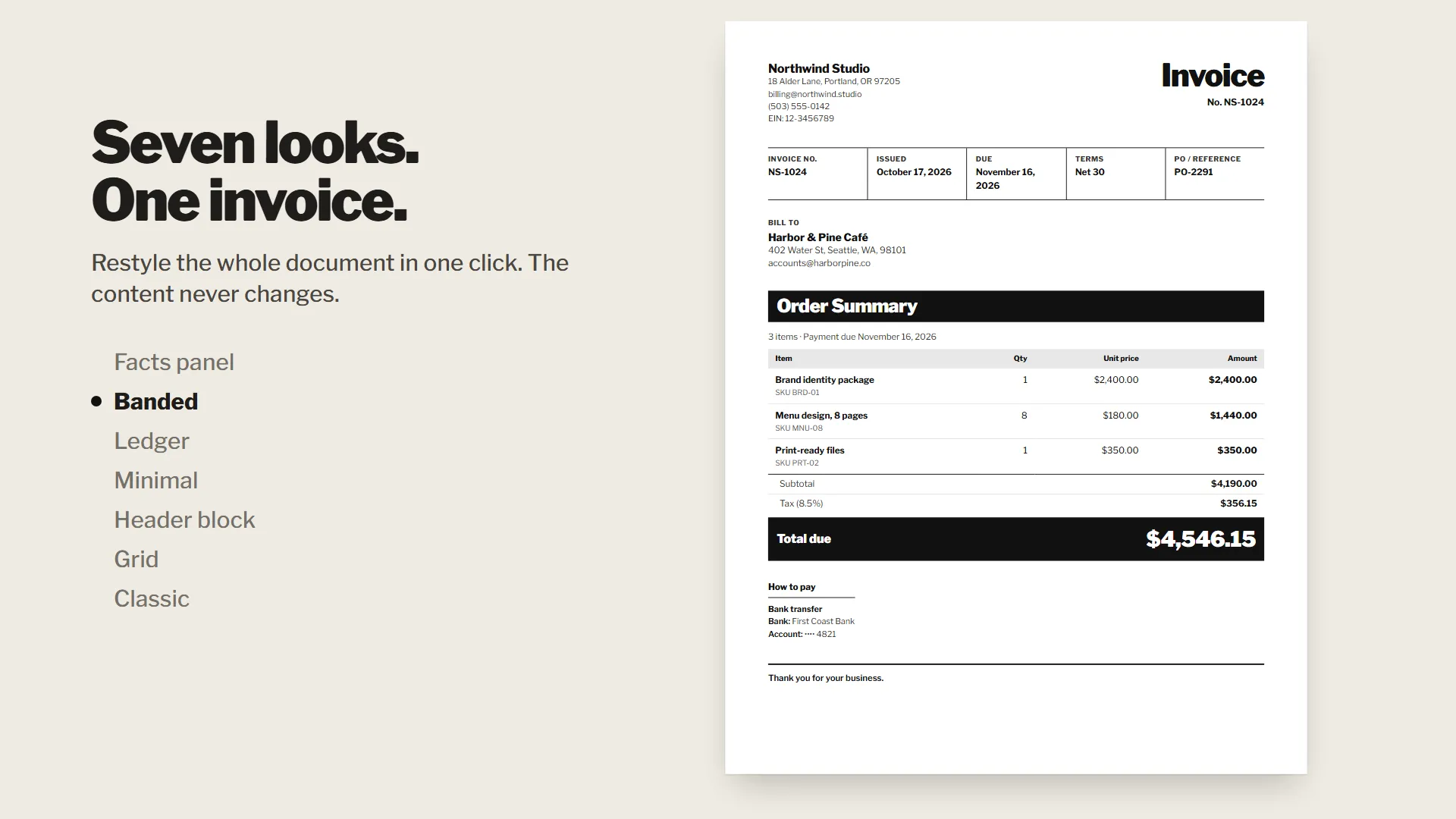
The default design borrows from the document everyone in the supplement industry already knows: the Supplement Facts label on the bottle. Hierarchy comes from heavy bars and thin rules instead of boxes, and a single accent color marks only what matters, the amount due.
There are seven styles in all: Facts panel, Banded, Ledger, Minimal, Header block, Grid, and Classic. Each one is a set of overrides on the same invoice model, so a style can change how the total looks but can never change the total. The accent color is yours to pick, with a contrast check that warns when it’s too pale to read on paper.
Private by design
The promise is that nothing leaves the device, and the build enforces it instead of just saying so:
- No third-party requests. Fonts are bundled, and a Content Security Policy only lets the app talk to its own origin.
- Encrypted backups. One file holds everything, with optional password protection (AES-256-GCM, keys derived on the device). The password is never stored, and a safety copy is saved before any restore.
- Safe uploads. Images are checked by their file signature, then re-encoded, which strips location data and anything hidden inside.
- Safe exports. CSV cells that could run as spreadsheet formulas are neutralized, and all text is escaped in both the preview and the PDF.
- Validated storage. Everything read back from storage or a backup file is rebuilt field by field, with type and length limits.
- Works offline. The Windows app runs fully offline, PDF creation included, and the browser version still installs with its own icon.
Under the hood
- Money is integers. Every amount is computed in cents (or whole yen), so the totals always add up.
- One model, two renderers. The preview and the PDF are built from the same invoice data, so they can never disagree.
- Fast to open. The PDF engine only loads when you save one, which keeps the first load at about 68 KB.
- Tested. 45 unit tests cover money math, tax modes, numbering, history totals, CSV escaping, and encrypted backups, including a wrong password and a tampered file.